
AI video generator for TikTok
GifChat is an AI video generator for TikTok that does one kind of video properly: the faceless text story. Give it an idea in a sentence, or nothing at all, and it writes the chat, picks a real GIF reaction for every message, reads both sides in AI voices, adds captions and sound effects, and hands you a 1080x1920 MP4 built for TikTok, Reels and Shorts.
The studio needs a GifChat account, which you create in the iPhone app.
What an AI video generator for TikTok should actually do
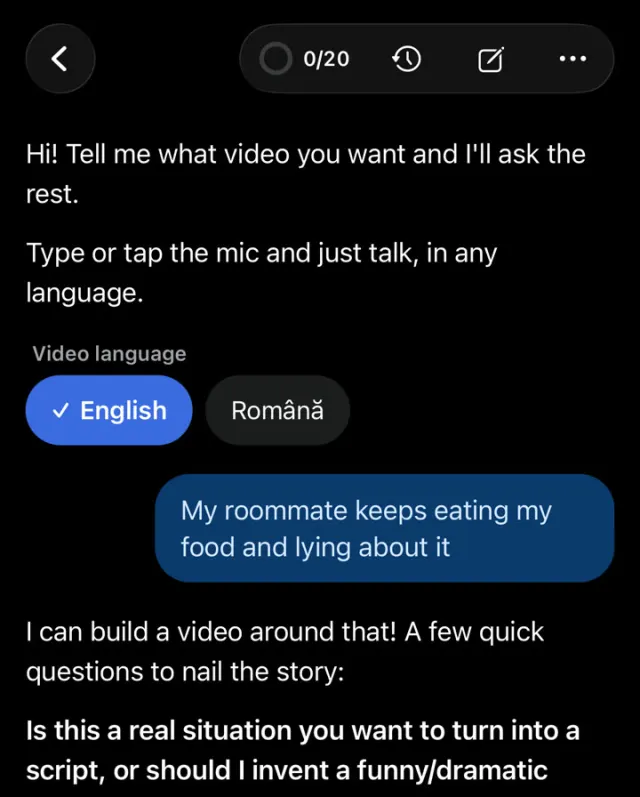
Plenty of AI tools can produce moving pictures. On TikTok that is rarely the hard part. The hard part is the first second, the pace, and an ending people want to talk about. GifChat handles the whole chain for you: the premise, a script that opens mid-tension, escalates and turns near the end, an emotion tag on every message so the voice reads it the right way, a GIF reaction chosen for each line, captions timed to the voices, and sound effects placed on the beats that deserve them. There is no timeline to edit. You choose the options, press Generate, and download the finished video.
Built for the way TikTok is watched
People scroll TikTok with the sound on and with it off, so a GifChat video works both ways: the chat and the captions carry the story in silence, and two contrasting AI voices turn it into a scene when the sound is up. The video is vertical 9:16 at 1080x1920, so nothing gets cropped. You pick 30 seconds, 1 minute or 2 minutes. Under the chat you can run the clean GifChat background, Minecraft parkour, Minecraft 2, Subway Surfers, or your own video or image, which keeps the eye busy while the story is read.
Five ways to start, or just talk to it
Surprise me invents the whole story in one tap. Write a scenario turns one sentence of yours into a full chat, in a tone you pick: Funny, Sarcastic, Dramatic, Romantic, Wholesome, Chaotic, Aggressive or Chill. Debate has two people argue a topic at the heat level you choose. Start from a picture builds the story around a real photo or clip, which then opens the video. Paste a script takes a chat you already wrote. If you would rather not fill in anything, Make it with AI asks what you want one question at a time and remakes the video from your feedback.
What it does not do
GifChat does not make talking avatars, stock-footage montages or lip-synced faces. Nobody appears on camera, and you never record your own voice. If the video you want for TikTok is a chat story with reactions, voices and captions, that is exactly what it is for.
How to make one with GifChat
Get the iPhone app
Create your account in GifChat. Every new account gets 3 free minutes of video, once.
Choose how to start
Surprise me, Write a scenario, Debate, Start from a picture or Paste a script. Or open Make it with AI and describe the video in your own words.
Set the length
30 seconds is a good first TikTok. Minutes are counted by the length of the finished video, so it uses half a minute.
Pick voices and GIF packs
A voice per person from more than 20 AI voices, and at least one GIF pack each so their reactions look different.
Choose captions and a background
One of 9 caption styles and 8 caption looks, then the clean chat, a gameplay split-screen or your own clip.
Generate and post
Rendering usually takes two to five minutes. Download the MP4 and post it to TikTok, then the same file to Reels and Shorts.
Tips
- Write the idea as a conflict, not a topic. "He forgot her birthday and is pretending he planned a surprise" gives the AI a story; "birthdays" does not.
- Pick two voices that sound clearly different, so viewers know who is talking without reading the names.
- Short messages keep the pace up. If a line wraps to three rows on a phone, split it or cut it.
- Make a few short videos before a long one. You will learn faster which stories your viewers react to.
Questions
Is there a free way to try it?
Yes. Every new account gets 3 free minutes once, which is enough for several 30-second videos. Plans after that are Starter 20 minutes a month for $19.99, Creator 65 for $49.99 and Pro 200 for $99.99, bought in the iPhone app.
Does GifChat post to TikTok for me?
No. You download the MP4, or share it from your phone, and post it yourself. That way you write your own caption and choose when it goes up.
Do I need editing skills?
No. There is no timeline. The script, reactions, voices, captions, sound effects and music are put together for you.
Can I use the same video on Reels and Shorts?
Yes. The 1080x1920 MP4 fits all three. Minutes are counted once, however many places you post it.
Is there a watermark?
A small "Made with GifChat" mark is on by default. Creator and Pro can turn it off per video.
Related
Other formats
- Fake text message videos
- TikTok text stories
- Minecraft parkour stories
- Subway Surfers chat videos
- YouTube Shorts stories
- Fake text story generator
- AI text story video maker
- Text message videos with GIF reactions
- Reddit-style story chat videos
- Chat story videos in the browser
- Faceless video generator
- Viral video maker

Make your first one free
New accounts get 3 free minutes, once. Create yours in the iPhone app, then make videos there or in the studio at gifchat.app/studio.